2012/10/26

Hadoop + HiveからExcelへの帳票出力 (How to fetch data from Hadoop via Hive)


今回はHadoopおよびHiveを用いて抽出したデータを、Apache POIを使用してExcelシート上に出力します。

HiveはHiveQLというSQLに近い言語で開発が可能であり、JDBCドライバも提供されています。
過去の記事(Apache POI によるエクセルファイルの出力 その1)のソースコードを流用することで、極めて簡単にHadoopとExcelを連携させることができます。

Figure 1: Overall image

【バージョン】
HadoopおよびHiveはそれぞれ現時点で入手可能な最新の安定版を使用します。
  • Hadoop: Release 1.0.4 (12 October, 2012)
  • Hive:   Release 0.9.0 (30 April, 2012)
※Hive 0.9.0から、Hadoop1.xでの動作をサポートした様です。

また、HiveのJDBCドライバ(${HIVE_HOME}/lib/hive-jdbc-0.9.0.jar)がHadoop 1.xのAPIと不整合を起こしている様ですので、Hadoop 0.1xのhadoop-core-0.19.1.jarも併せて使用します。


【前準備】
サンプルプログラムのプロジェクトに、$HIVE_HOME/lib 配下のjarファイル、およびhadoop-core-0.19.1.jarを参照設定します。
※HiveのJDBCドライバ(hive-jdbc-0.9.0.jar)の依存するjarを特定していない為、今回は全てのjarを参照する事としています。

【実装】
ソースコードの変更は、DBコネクション生成に関わる部分のみです。


List 1: Main logic


package util;

import java.io.*;
import java.util.Iterator;
import java.sql.*;
import org.apache.poi.xssf.usermodel.*;
import org.apache.poi.ss.usermodel.*;


public class Ora2Excel {

  // db objects
  private Connection con;
  private Statement  stm;
  
  // poi objects
  private Workbook wbk;
  
  public Ora2Excel() throws SQLException {
    DriverManager.registerDriver(new org.apache.hadoop.hive.jdbc.HiveDriver());
  }

  public void openDb(String userId, String password, String connString) throws SQLException {
    con = DriverManager.getConnection(connString, userId, password);
    stm = con.createStatement();
  }
  
  public void closeDb() throws SQLException {
    stm.close();
    con.close();
  }
  
  public void openBook(String fileName) throws IOException {
    wbk = new XSSFWorkbook(fileName);
  }
  
  public void saveBook(String fileName) throws IOException {
    FileOutputStream out = new FileOutputStream(fileName);
    wbk.write(out);
    out.close();
  }
  
  public void closeBook() {
    wbk = null;
  }
  
  public void extract(String sheetName, String sql) throws SQLException {
    Sheet wsh = wbk.getSheet(sheetName);
    ResultSet rst = stm.executeQuery(sql);
    int colCount = rst.getMetaData().getColumnCount();
    
    // determine the start position: search "$start"
    int rowStart = 0;
    int colStart = 0;
    Iterator<Row> iRow = wsh.rowIterator();
    while (iRow.hasNext() && rowStart + colStart == 0) {
      Row currentRow = (Row) iRow.next();
      Iterator<Cell> iCol = currentRow.cellIterator();
      while (iCol.hasNext()) {
        Cell currentCell = (Cell) iCol.next();
        if (currentCell.getCellType() == Cell.CELL_TYPE_STRING  && currentCell.getStringCellValue().trim().equalsIgnoreCase("$start")) {
          rowStart = currentCell.getRowIndex();
          colStart = currentCell.getColumnIndex();
          break;
        }
      }
    }
    
    // get "template row"
    Row templateRow = wsh.getRow(rowStart);
    
    // set cell values
    int idxRow = rowStart;
    while (rst.next()) {
      wsh.shiftRows(idxRow, wsh.getLastRowNum()+1, 1);
      
      Row r = wsh.createRow(idxRow);
      for (int idxCol = templateRow.getFirstCellNum(); idxCol < templateRow.getLastCellNum(); idxCol++) {
        Cell c = r.createCell(idxCol);
        
        if (idxCol >= colStart && idxCol - colStart < colCount) {
          int idxDbCol = idxCol-colStart + 1;
          switch(rst.getMetaData().getColumnType(idxDbCol)){
          case Types.NUMERIC:
            c.setCellValue(rst.getDouble(idxDbCol));
            break;
          case Types.DATE:
              c.setCellValue(rst.getDate(idxDbCol));
            break;
          case Types.TIMESTAMP:
              c.setCellValue(rst.getDate(idxDbCol));
            break;
          default:
            c.setCellValue(rst.getString(idxDbCol));
          }
        } else if (templateRow.getCell(idxCol).getCellType() == Cell.CELL_TYPE_FORMULA){
          c.setCellFormula(templateRow.getCell(idxCol).getCellFormula());
        } else if (templateRow.getCell(idxCol).getCellType() == Cell.CELL_TYPE_NUMERIC){
          c.setCellValue(templateRow.getCell(idxCol).getNumericCellValue());
        } else if (templateRow.getCell(idxCol).getCellType() == Cell.CELL_TYPE_STRING){
          c.setCellValue(templateRow.getCell(idxCol).getStringCellValue());
        } 
        c.setCellStyle(templateRow.getCell(idxCol).getCellStyle());
        
      }
      idxRow++;
    }
    rst.close();
    
    // remove the template row.
    wsh.removeRow(templateRow);
    wsh.shiftRows(idxRow,  wsh.getLastRowNum()+1, -1);
    
    // calculate formula cells
    XSSFFormulaEvaluator.evaluateAllFormulaCells((XSSFWorkbook) wbk);
  }
}

【テスト用ソース(呼び出し部)】
上記クラスを呼び出す側の例を以下に示します。


List 2: Calling Main Logic


import util.Ora2Excel;

public class Test1 {

  public static void main(String[] args) throws Exception {
    Ora2Excel o2x = new Ora2Excel();
    
    o2x.openDb("", "", "jdbc:hive://HiveServer:10000/default");
    
    o2x.openBook("c:\\template.xlsx");
    o2x.extract("Sheet1", "select deptno, empno, ename, job, mgr, hiredate, sal, comm from emp order by deptno, empno");
    o2x.saveBook("c:\\result.xlsx");
    o2x.closeBook();
    
    o2x.closeDb();
  }
}


HiveのJDBCドライバはまだ開発途上ではありますが、Hadoopから帳票を出力する際には極めて効率的なツールであると言えます。

参考URL:
https://cwiki.apache.org/Hive/hiveclient.html


[Summary]
Hive provides JDBC driver.  List 1 shows how to get data from Hadoop via Hive.

The version of Hadoop and Hive are:
  • Hadoop: Release 1.0.4 (12 October, 2012)
  • Hive:   Release 0.9.0 (30 April, 2012)
${HIVE_HOME}/lib/hive-jdbc-0.9.0.jar needs other jar files under ${HIVE_HOME}/lib.
Since it needs org/apache/hadoop/io/Writable that is not included in Hive 0.9.0, this time I bring hadoop-core-0.19.1.jar from another project.
To run the source code, you have to add these jar files above as External JAR.

Please see Export to Excel file via Apache POI, Part 1 for your reference.

2012/10/11

update文と副問い合わせ (UPDATE with sub query)


見逃されがちなUPDATE文の構文について説明します。


以下のSQLは、同一の表 sales に副問合せで3回アクセスしています。

List 1:

update customers cst
   set last_purchase_date = (select max(time_id) from sales where cust_id = cst.cust_id),
       total_amount       = (select sum(amount_sold) from sales where cust_id = cst.cust_id),
       annual_amount      = (select sum(case when time_id > to_date('20000101','yyyymmdd') then amount_sold else 0 end) from sales where cust_id = cst.cust_id)
 where cust_id = 2


call     count       cpu    elapsed       disk      query    current        rows
------- ------  -------- ---------- ---------- ---------- ----------  ----------
Parse        1      0.00       0.00          0          0          0           0
Execute      1      0.00       0.00          0        389          2           1
Fetch        0      0.00       0.00          0          0          0           0
------- ------  -------- ---------- ---------- ---------- ----------  ----------
total        2      0.00       0.00          0        389          2           1


Rows (1st) Rows (avg) Rows (max)  Row Source Operation
---------- ---------- ----------  ---------------------------------------------------
         0          0          0  UPDATE  CUSTOMERS (cr=389 pr=0 pw=0 time=2019 us)
         1          1          1   INDEX UNIQUE SCAN CUSTOMERS_PK (cr=2 pr=0 pw=0 time=20 us cost=1 size=40 card=1)(object id 76070)
         1          1          1   SORT AGGREGATE (cr=129 pr=0 pw=0 time=854 us)
       176        176        176    TABLE ACCESS BY GLOBAL INDEX ROWID SALES PARTITION: ROW LOCATION ROW LOCATION (cr=129 pr=0 pw=0 time=829 us cost=90 size=1690 card=130)
       176        176        176     INDEX RANGE SCAN SALES_CUST_IX (cr=3 pr=0 pw=0 time=21 us cost=3 size=0 card=130)(object id 76319)
         1          1          1   SORT AGGREGATE (cr=129 pr=0 pw=0 time=421 us)
       176        176        176    TABLE ACCESS BY GLOBAL INDEX ROWID SALES PARTITION: ROW LOCATION ROW LOCATION (cr=129 pr=0 pw=0 time=282 us cost=90 size=1300 card=130)
       176        176        176     INDEX RANGE SCAN SALES_CUST_IX (cr=3 pr=0 pw=0 time=10 us cost=3 size=0 card=130)(object id 76319)
         1          1          1   SORT AGGREGATE (cr=129 pr=0 pw=0 time=567 us)
       176        176        176    TABLE ACCESS BY GLOBAL INDEX ROWID SALES PARTITION: ROW LOCATION ROW LOCATION (cr=129 pr=0 pw=0 time=550 us cost=90 size=1300 card=130)
       176        176        176     INDEX RANGE SCAN SALES_CUST_IX (cr=3 pr=0 pw=0 time=192 us cost=3 size=0 card=130)(object id 76319)


この様なupdate文については、以下の構文への変換が効果的です。

List 2:

update customers cst
   set (last_purchase_date, total_amount, annual_amount)
       =
       (select max(time_id),
               sum(amount_sold),
               sum(case when time_id > to_date('20000101','yyyymmdd') then amount_sold else 0 end)
          from sales
         where cust_id = cst.cust_id)
 where cust_id = 2


call     count       cpu    elapsed       disk      query    current        rows
------- ------  -------- ---------- ---------- ---------- ----------  ----------
Parse        1      0.00       0.00          0          0          0           0
Execute      1      0.00       0.00          0        131          2           1
Fetch        0      0.00       0.00          0          0          0           0
------- ------  -------- ---------- ---------- ---------- ----------  ----------
total        2      0.00       0.00          0        131          2           1


Rows (1st) Rows (avg) Rows (max)  Row Source Operation
---------- ---------- ----------  ---------------------------------------------------
         0          0          0  UPDATE  CUSTOMERS (cr=131 pr=0 pw=0 time=672 us)
         1          1          1   INDEX UNIQUE SCAN CUSTOMERS_PK (cr=2 pr=0 pw=0 time=11 us cost=1 size=40 card=1)(object id 76070)
         1          1          1   SORT AGGREGATE (cr=129 pr=0 pw=0 time=604 us)
       176        176        176    TABLE ACCESS BY GLOBAL INDEX ROWID SALES PARTITION: ROW LOCATION ROW LOCATION (cr=129 pr=0 pw=0 time=725 us cost=90 size=2340 card=130)
       176        176        176     INDEX RANGE SCAN SALES_CUST_IX (cr=3 pr=0 pw=0 time=12 us cost=3 size=0 card=130)(object id 76319)


実行計画からも、処理が改善された事が分かります。
sales 表への読み込みが3回→1回に減ったことで、論理読み込みも低減しています。

最近の潮流ではExadata等、足回り(H/W)の強化でボトルネックを解消する事が多くなっていますが、ミッションクリティカルなシステムでは、この様に処理そのものの改善で対応する事が先決です。


[summary]
List 1 shows bad UPDATE statement.  It accesses sales table three times.
To reduce consistent read access, it should be written like List 2.


2012/02/08

帳票ツールの独自開発 (Create your own reporting tool)

OTN にて、ライセンス料が取り上げられていました。数年越しの話題のようです。
BIP way too expensive. Check out BIP in $$$ terms.
https://forums.oracle.com/forums/thread.jspa?threadID=977589

Oracle BI Publisherに限らず、帳票ツールの導入に際しては初期ライセンス費用に加えてサポート費用も要します。また、帳票ツールの使用経験者は市場にほとんど流通していませんので、採用費用、または帳票ツールの使用方法そのものを学ぶための準備期間、場合によってはベンダーコンサルの費用も計上しなければなりません。
これらの帳票ツール導入に関わる初期費用が導入効果を(短期的とはいえ)上回ってしまうため、一定規模以上のプロジェクトでない限り、導入が見送られることが多いのも実情です。
※なお、Oracle BIには Oracle BI SE One という廉価版ライセンスも用意されています。BI Publisher もこのライセンス内に含まれています。

このような状況では、「社内用の簡単なレポートツールでも作るか」という話も出かねません。実際にサンプルを作ってみました。
高機能は必要なく、テンプレートに記載したSQLで単一のDBを検索した結果をテンプレート(エクセル)上に出力するだけ、という仕様です。

【画面概要】
以下の様なアプリを想定します。

  • サーバに配置されたテンプレートファイルがブラウザ上で一覧される。
  • ユーザがブラウザ上のファイルを選択すると、テンプレートファイルに応じたパラメータ設定画面が開く
  • パラメータを設定し、「Export」ボタンを押すとファイルがダウンロードされる。


【テンプレートファイル】
テンプレートファイルは以下の様に2つのシートで構成される仕様とします。
  • シート「$template」は出力結果が展開されるシートです。
  • シート「$property」にはテンプレートの説明や、バインド変数として受け渡すパラメータの定義を記載します。

画面写真を撮りがてら、ASP.NET (C#)でざっくりとコーディングしてみましたが、数時間で一通りの動作を実装できます。
(※データ抽出およびエクセルシートへの展開部分については過去の記事(エクセルファイルのバッチ出力 その3)のソースを流用しました。)
ロールによるアクセス権限制御、監査用のログ出力などの最低限の機能を考慮しても、設計を含め概ね1人月程度あれば簡易的なツールは構築できそうです。

当初は「帳票ツールを自作するコストを考えれば、ライセンスを購入する方が絶対に有利」という流れの記事を書く予定でしたが、想定に反して、要求される非機能要件や帳票要件が限られているという前提であれば、自作も検討に値するという結果になりました。
※社内での工数単価や稼働をどのように計上するかは各企業次第ですので、自主開発が有利か否かの判断は一概には行えません。

自主開発版のツールから、性能要件や機能要件に合わせて商用ツールの導入を検討するというステップも考えられます。


[Summary]
BIP way too expensive. Check out BIP in $$$ terms.
https://forums.oracle.com/forums/thread.jspa?threadID=977589


BI Publisher (or other reporting tools) costs you certain amount of money.
If you think it is too expensive, then DIY.  If your requirements are not so complicated, and the workload is not heavy, it is worth considering DIY a simple, your own reporting tool.


I've created a sample tool with ASP.NET (C#).  It took about four hours to make this - I suppose you may need less than one man-month to create your original reporting tool.


The figure above shows how the sample works.

2012/01/27

動的な列構成の変更 (Dynamic columns in the report)

OTNに表の列構成を動的に変更させる方法が質問されていました。
Thread: Hiding Column keeping the table size constant
https://forums.oracle.com/forums/thread.jspa?threadID=2332900

スレッドでは解決に至っていませんが、列数(表のパターン)があらかじめ判明している場合には、行または表そのものを切り替える方式が効果的です。以下に例を示します。

出力例は以下の通りです。
Figure 1: output

1つ目のサンプルでは、deptnoのグループ毎に表の構造をif分岐で切り替えます。
2つ目のサンプルでは、行ごとに列の構造を切り替えます。

タグの設定内容は以下の通りです。
Figure 2: Settings

テンプレートおよびデータはここからダウンロードできます。


[Summary]
Thread: Hiding Column keeping the table size constant
https://forums.oracle.com/forums/thread.jspa?threadID=2332900

The sample above explains how to switch the table structure.  The first example shows how to switch the table structure.  The second example switches the row structure in each row.
The sample template is available here.

2012/01/24

ラウンドトリップタイム (Round-Trip Time; RTT)

海外拠点やクラウド事業者、災対サイトなど、ラウンドトリップタイム(RTT) が長い場所にあるDBから(やむを得ず)直接データを取得しなければならないケースが増えてきています。

ほとんどのDBクライアント用ドライバは、結果セットを分割して取得する仕様を採用しています。JDBCを例にとると、デフォルトでは10行ずつデータを取得(フェッチ)します。したがって、結果セットが25行ある場合、実際にはAPサーバとDBサーバの間ではデータが3回に分けて転送され、2回分のRTTが余分に経過します。

帳票は一般的に扱う行数が多い傾向があります。LPAR間などであれば問題が顕在化しないこともありますが、以下のいずれかに当てはまる場合、フェッチサイズの調整は検討に値します。
  • DBサーバとの間のRTTが長い
  • 取得する行数が極端に多い
また、プロジェクトで使用するフレームワークや共通部品は、場面に応じたフェッチサイズ変更を考慮した設計をお勧めします。

[Summary]
You can reduce the database round-trip by setting appropriate fetch size.

2012/01/17

Apache POI によるエクセル帳票出力の並列実行 その2 (Apache POI parallel processing, Part 2)


前回の並列実行の検証では、3スレッドまでは高い性能向上を示した後、伸び率が低下することが確認されました。
今回は、この時のOS統計を確認します。

【CPU】
CPU使用率の推移は以下の通りです。
※なお、検証環境の物理コア数は4です。
Figure 3: CPU usage

設定したスレッド数以上のコアが使用されていることが確認できます。これはJVM自身の挙動に関わるオーバーヘッドであり、これらを含めたスレッド数が物理コア数を超えたことで4スレッド時点で性能の伸び率が鈍化し始めたと想定されます。
※本記事ではこれ以上の調査は行いません。
過去にCOM経由でエクセルを操作した際の値と比較すると、CPU使用率が非常に低く抑えられています。性能の伸び率の高さは、このCPU使用率の余裕から生まれていると考えられます。

プロセッサ・キュー(Processor Queue Length)の値は6スレッドから目立ち始め、7スレッド以降は過負荷であることを示しています。
Figure 4: Processor Queue Length

参考まで、コンテキスト・スイッチ(Context Switches/sec)の発生も確認します。COM経由でExcelを操作した際の値と比較すると、10分の1以下で推移しています。
Figure 5: Context Switches / sec


【メモリ】
スレッド数の増加に伴って開きメモリが減少しますが、5GB以上の余裕があります。
グラフは割愛しますが、ページングも発生しておらず、問題は見られません。
Figure 6: Available Memory (MB)

【ディスク】
ディスクへの負荷はそれほど高くありません。グラフは割愛しますが、キューの待機も発生していません。
Figure 7: Disk usage

【GC】
今回はヒープを十分に確保(1GB)したため、Full GCは発生していません。参考まで、以下にJVMの推移を示します。
Figure 8: GC

※NEWについては改善の可能性もありますが、今回の検証ではこれ以上のチューニングは行わないこととします。

【結果】
以前の検証でエクセルによる帳票出力(COM経由での操作)を行ったときと同様、CPUの処理容量に依存しやすい傾向が確認されました。
※参照:「リンク」

COM経由でエクセルを操作する場合と比較すると、単位時間当たりの出力性能はApache POIが大幅に上回っています。
また、Apache POIを使用する場合はサーバ側のOSを選ばない点、およびサーバ側にエクセルのライセンスが不要である点も優位であるといえます。
しかしながら、Apache POI(またはその他のライブラリ)を使用する際には機能制限に留意する必要があります。現行バージョンの3.7ではXSLX形式の条件付書式に対応していない(次期3.8で対応予定)等、ユーザ要件を満たせない場合があります。エクセルのもつ機能・表現力を十分に発揮させたい場合には、これらの機能制限が不利となります。

帳票要件の複雑さと処理性能や実装環境を考慮し、Excelによる実装とApache POI等の外部ライブラリでの実装を使い分けることをお勧めします。
管理面からは「実装方式を一本化する」という方針が魅力的に見えることがありますが、実際には機能制限の回避や性能問題の解消などに不要な出費を強いる原因となりがちです。技術者の確保も容易な分野ですので、相当の理由がない限り、一本化は避けることをお勧めします。


[Summary]
OS statistics shows that Apache POI file processing is CPU bound.Please see Figure 3 to 7.
For your reference, Figure 8 shows JVM GC statistics.


The advantages of Apache POI:  The performance Apache POI manipulation is much faster than the performance of COM-Excel manipulation.  In addition, you do not need the Excel licence on the server side.
The disadvantage  of Apache POI: Apache POI does not support all the functions that Excel provides.

2012/01/12

Apache POI によるエクセル帳票出力の並列実行 その1 (Apache POI parallel processing, Part 1)


前回のサンプルプログラムについて、並列処理で単位時間当たりの処理能力の向上を図り、どの程度リニアに性能が向上するかを検証します。

【検証の方法について】
通常の運用であれば、スケジューラのジョブを並列実行させますが、今回のサンプルではプログラム内で複数スレッドを生成することで検証を行います。
検証環境は「エクセルファイルのバッチ出力 その5」と同様です。
※本記事は帳票出力の並列実行をプログラム内で実装することを推奨しているわけではありません。エミュレートが目的です。

【サンプルソース(呼び出し部)】
サンプルのソースの内、呼び出し側を以下の様に修正します。
並列度はソース内のNUM_THREADSで指定し、ExecutorServiceを使用して実行スレッド数と同数のスレッドプールを生成します。
並列度は1から8(論理コア数)まで変化させ、各スレッドで1000ファイルを出力するまでに経過した時間を計測します。

List 1:


public class Test2 {
  private static final int NUM_THREADS = 1;

  public static void main(String[] args) {
    System.out.println(new Date());
    
      ExecutorService executor = Executors.newFixedThreadPool(NUM_THREADS);
      
      for(int j=0; j < NUM_THREADS; j++){
      executor.execute(new Runnable(){
        public void run() {
        long timeStarted = System.currentTimeMillis();
          try {
          Ora2Excel o2x = new Ora2Excel();
          
          o2x.openDb("scott", "tiger", "jdbc:oracle:thin:@windows2003srv:1521:orcl");
          
          for (int i = 0; i <1000; i++) {
            o2x.openBook("c:\\template.xlsx");
            o2x.extract("Sheet1", "select deptno, empno, ename, job, mgr, hiredate, sal, comm from emp order by deptno, empno");
            o2x.saveBook("c:\\temp\\result_" + Thread.currentThread().getId() + "_" +  i + ".xlsx");
            o2x.closeBook();
          }
          
          o2x.closeDb();
          System.out.println("finish: " + Thread.currentThread().getId() + "=" + (System.currentTimeMillis()- timeStarted));
          
        } catch (Exception e) {
          e.printStackTrace();
        }
        }
      });
    }
      executor.shutdown();
  }   
}

【サンプルソース(本体部)】
本体部のソースに変更はありません。ソースは「Apache POI によるエクセル帳票出力の並列実行 その1」を参照してください。

【結果】
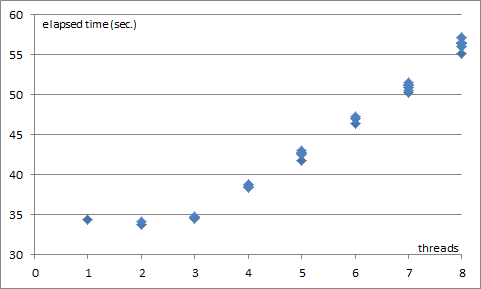
出力性能の結果は以下の通りとなりました。以下のグラフは、横軸が多重度(スレッド数)を表し、縦軸が各スレッドの処理完了時間(秒)を表します。1多重から3多重までは処理時間はほぼ変動せず、約35秒で推移していますが、4多重以降は処理時間が増加していることが確認できます。
Figure 1: Elapsed Time

上記の結果を、1秒当たりの出力ファイル数に換算した結果を以下に示します。縦軸は1秒当たりの出力ファイル数です。
Figure 2: Performance Result

1多重での出力性能は1秒間に29ファイルです。2多重及び3多重ではほぼ100%の性能向上が確認できます。
4多重(物理コア数に同じ)でも89%とまずまずの成績です。
5多重から先は性能が頭打ちになり、8多重では61%の性能向上となっています。


C#からCOM経由でExcelを操作した場合(「エクセル帳票出力の並列実行 その1」を参照)と比較しても性能向上の割合が優れています。

次回はOS統計を確認します。


[Summary]
In this post, we'll see the performance of Apache POI with parallel (multi thread) processing.

[Environment]

[Test source]
In the ordinary batch system, you may run programs by job scheduler parallel.  In this test, I implement multi thread processing within the sample program.  Please refer List 1.

[Source (main part)]
No changes have been made.  Please refer to Export to Excel file via Apache POI, Part 1 for the source code.

[Result]
In Figure 1 and Figure 2, the bottom axis represents the number of threads.
Figure 1 shows the elapsed time for each thread.
Figure 2 shows the output performance.  Single thread performance is 29 files per sec.  Until three thread, it keeps almost 100% performance increase.

In the next post, we read the OS statistics.