ラベル Security/セキュリティ の投稿を表示しています。 すべての投稿を表示

2011/06/07

ログインユーザの取得 (Display the login user ID)

BI PublisherにログインしているユーザのIDを取得する方法について説明します。過去に数回、OTNで取り上げられています。
http://forums.oracle.com/forums/thread.jspa?threadID=1773888

ユーザIDおよびその他の情報の取得方法について、ここで整理します。

【SQLで指定する方法】
既存のSQLにxdo_user_nameを埋め込むことで取得できます。以下の例では、ログインユーザのIDで部門(deptno)を特定し、ユーザの所属する部門のデータのみを出力する様、制限をかけています。
select * from emp where deptno = (select deptno from emp where empno = :xdo_user_name)

主となるデータソースがSQLでない場合、以下のSQLを別途データセットに定義します。
select :xdo_user_name as user_id from dual
Figure 1: data source for 'xdo_user_name'


その後、作成したデータセットを以下の様に本体のデータソースと結合します。以下の例では、エクセルのデータと結合を行い、ログインしたユーザのIDがEMPNOと合致するレコードだけを抽出します。
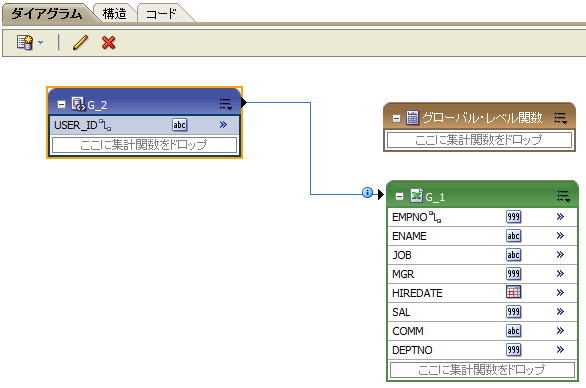
Figure 2: data source join


なお、ユーザID以外にも以下の項目を取得することができます。
  • xdo_user_roles
  • xdo_user_report_oracle_lang
  • xdo_user_report_locale
  • xdo_user_ui_oracle_lang
  • xdo_user_ui_locale


以下のブログも併せて参照して下さい。
http://blogs.oracle.com/xmlpublisher/entry/who_is_on_first_but_what_langu


[Summary]
xdo_user_name provides current user name. The SQL below shows the record which belongs to the same deptno with current user.
select * from emp where deptno = (select deptno from emp where empno = :xdo_user_name)


In case when your data source is not SQL, you can join the following SQL with your data source (Figure 1 and Figure 2).
select :xdo_user_name as user_id from dual

Also, the following items are available.
  • xdo_user_roles
  • xdo_user_report_oracle_lang
  • xdo_user_report_locale
  • xdo_user_ui_oracle_lang
  • xdo_user_ui_locale
For details, please refer to the following links:

2011/05/17

PDFセキュリティ (PDF security options)

BI PublisherのPDF出力オプションは「ランタイムオプション」で設定することができます。
Figure 1: Runtime property tab


【動的なオプション設定】
バースティングの際にファイル毎に個別の(異なる)パスワードを設定したい、という要件はほぼ確実に想定されます。このような場合には、上記の画面ではなく、テンプレートにて設定を行います。

以下のURLに方法が紹介されています。
http://blogs.oracle.com/xmlpublisher/2010/02/securing_burst_output_document.html


MS-Wordにて、ファイルのプロパティ画面を開きます。「ユーザ定義」タブを選択し、文書のプロパティにPDF出力オプションをあらわす文字列を埋め込みます。
以下の例では、PDFファイルのパスワードにempnoの値を設定します。


xdo-pdf-security:  true
xdo-pdf-open-password: {/ROWSET/ROW/EMPNO}
Figure 2: MS-Word property dialog


【オプションの一覧】
PDF出力オプションを以下に一覧します。
  • xdo-pdf-security
  • xdo-pdf-open-password
  • xdo-pdf-permissions-password
  • xdo-pdf-encryption-level
  • xdo-pdf-no-changing-the-document
  • xdo-pdf-no-printing
  • xdo-pdf-no-accff
  • xdo-pdf-no-cceda
  • xdo-pdf-enable-accessibility
  • xdo-pdf-enable-copying
  • xdo-pdf-changes-allowed
  • xdo-pdf-printing-allowed
これらのPDF出力オプションは以下のマニュアルに一覧されています。 http://download.oracle.com/docs/cd/E10383_01/doc/bip.1013/b40017/T421739T421745.htm#4419522


[Summary]
You can set PDF file options in Runtime Options tab (Figure1).


Runtime (dynamic) security setting
The setting above is static (fixed).
To achieve the requirement such as "set different password on each bursted PDF files", you need to set these security properties on the RTF template file.
To set file open password, define xdo-pdf-security and xdo-pdf-open-password on the file properties dialog (Figure 2).  In the example, the value of EMPNO is set for the password.
For details, please refer the following URL: (English)
http://blogs.oracle.com/xmlpublisher/2010/02/securing_burst_output_document.html


PDF Security options
The manual below helps you to find the property name.  Note that you need to add prefix "xdo-".